

There’s been steady progress in AI upscaling tools over the past couple of years, but most still come with trade-offs. You can gain resolution, but sometimes at the expense of texture, edge integrity, or overall realism.
Recently, Leonardo AI introduced what it calls its Pro Upscaler, capable of increasing images up to 105 megapixels. You read that correctly, up to 105 megapixels. After spending some time testing it, I found the results impressive and worth a closer look, especially for photographers and digital artists considering wall art or offset printing.
This is not just about making images bigger. It’s really about how well those images hold together when you do.
What Leonardo’s Pro Upscaler Actually Does
At a basic level, the Pro Upscaler takes an existing image and significantly increases its resolution, up to 105MP. That puts it into territory that starts to make sense for:
Large wall art
Commercial display prints
Cropping flexibility without losing output size
What makes it notable is not just the size increase, but how it interprets detail. Instead of simply stretching pixels or applying traditional sharpening, it attempts to reconstruct detail in a way that aligns with the original image content.
In practice, that means:
Edges are cleaner without looking artificially sharpened
Textures are more believable than many earlier AI upscalers
Gradients and tonal transitions tend to stay smooth
Why Up To 105 Megapixels Doesn’t Mean Always 105
The easy explanation is that Pro Upscaler increases the sizes in defined steps. So, if the overall size will exceed 105 megapixels, the application will limit itself to the next lower step. Dedicated applications like Topaz Gigapixel also have limits.
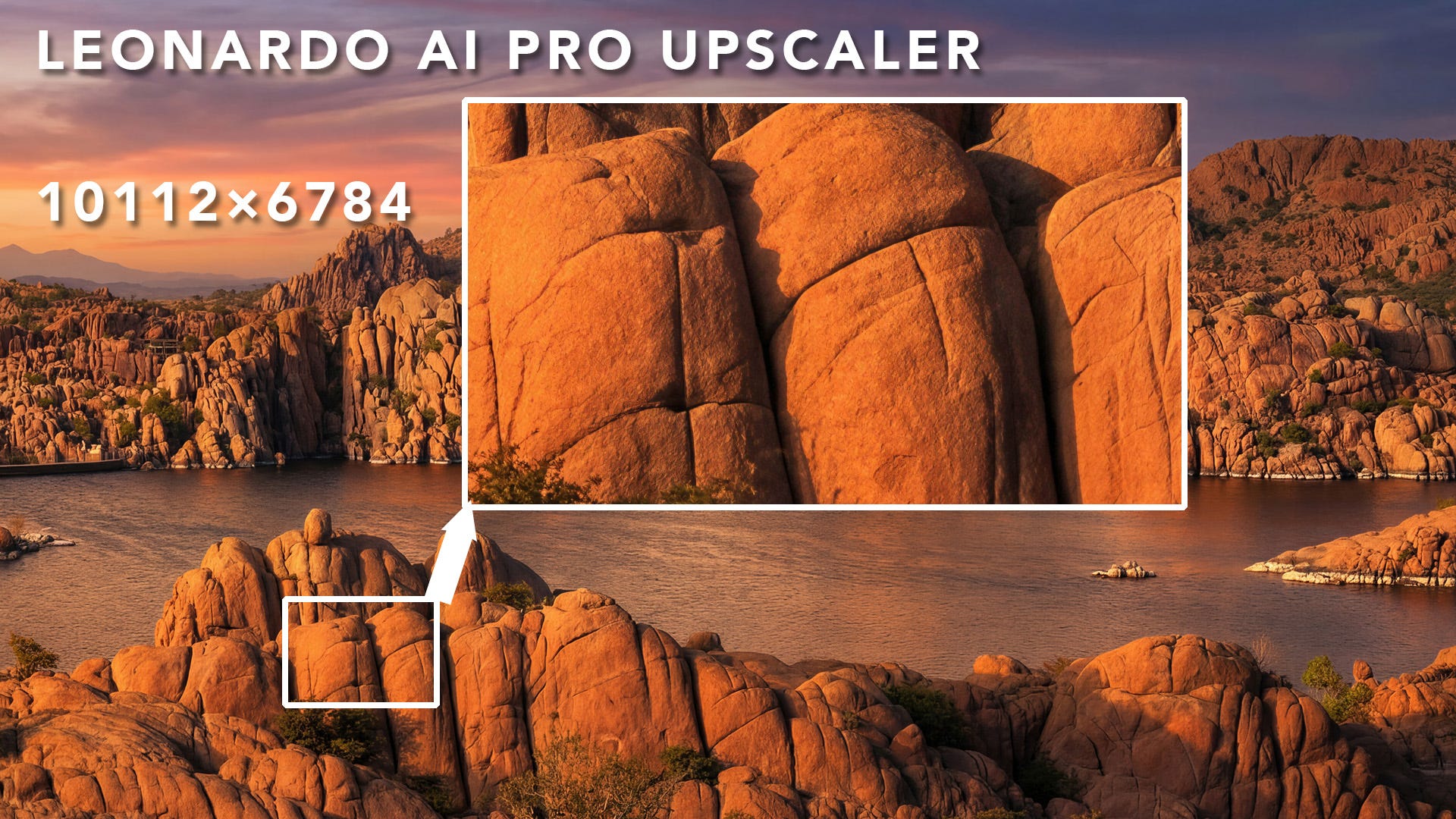
In the example image of Watson Lake, AZ, we enlarged the original Nano Banana Pro image from a not-so-bad 5056×3392 pixels to 10112×6784 pixels, or 68.59 megapixels.
Where It Fits in a Photographer’s Workflow
For photographers working with AI-assisted images or transformations, upscaling has always been one of the final hurdles.
A typical workflow might look like this:
Capture the original photograph
Process and refine in your editor of choice
Apply AI-based transformation or enhancement
Prepare for output, including resizing and sharpening
That last step is where tools like this come in.
Traditionally, many photographers rely on:
Topaz Labs tools like Gigapixel
Native resizing in Photoshop
Other third-party AI upscalers
The Leonardo Pro Upscaler now enters that conversation, particularly for those already working inside its ecosystem.
What Stands Out in Real-World Use
From hands-on use, a few things become apparent fairly quickly:
1. It Handles AI-Generated Content Naturally
This might sound obvious, but it matters.
Because the tool is designed within an AI image generation platform, it seems particularly well tuned to AI-generated or AI-transformed images, where traditional upscalers sometimes struggle with invented textures or stylized details.
2. It Preserves Structure Well
One of the biggest concerns with any upscaler is whether it distorts the underlying composition.
In most cases, the Pro Upscaler maintains:
Line integrity
Object boundaries
Overall composition
That makes it more usable for photographers who want to stay true to the original image structure.
3. It Pushes Into Print-Ready Territory
At 105MP, you are no longer just improving screen resolution. You are working in a range that supports:
Larger-format prints
Gallery-style wall pieces
Cropping flexibility without starting over
For those creating work as wall art or offset printing, this becomes a practical advantage.
How It Compares to Other Upscaling Approaches
It’s not necessarily a replacement for everything else, but it adds another option.
Topaz Gigapixel still offers strong control and consistency, especially for traditional photography workflows, but I have found that Gigapixel struggles with artifacts in AI images.
Photoshop resizing remains predictable and integrated into existing pipelines, but again magnifies the imperfections and artifacts.
Leonardo Pro Upscaler works very well on AI-generated imagery, even photo-based enhancements.
If you’re already generating or transforming images in Leonardo, this can simplify your workflow and frustration.
A Few Considerations
As with any AI tool, it’s not perfect in every situation.
Extremely fine textures can occasionally look slightly interpreted rather than captured
Results may vary depending on the source image quality, which is always the case
It works best when the base image already has strong structure and clarity
In other words, it’s still important to start with a solid image, whether that’s a photograph or a carefully guided AI transformation.
Where That Leaves Us
Upscaling used to be a technical afterthought. Now it’s becoming a meaningful part of the creative and production process.
Tools like Leonardo’s Pro Upscaler are pushing that shift further by making it easier to move from a photo-based AI enhancement or transformation to a finished image to a large-scale output.
As we often say, the takeaway for photographers is straightforward:
AI tools can extend what your images can become, but they still work best when grounded in strong original work and clear intent. Leonardo’s Pro Upscaler is no exception.
If you’re already using Leonardo AI, the Pro Upscaler is worth testing in your own workflow, especially if print is part of your end goal. It’s a staged rollout, so if you don’t find it now, it should be available to you soon.
So, if you’re creating images for display, licensing, or print:
You now have another viable option for large-scale output
You can stay within a single platform from generation to final file
You can test how AI-native upscaling compares to your current tools
And if you’re working from your own photographs, this becomes another piece of the larger puzzle: using AI to extend your work without losing what made it yours in the first place.
Thank you for reading.
And remember… Stay Curious. Keep Exploring. And most of all, Enjoy Creating!